- 公開日
- 最終更新日
【EventBridge スケジューラ】AWS CLI による作成ガイド(詳細版)
この記事を共有する



目次
はじめに
本記事では、Amazon EventBridge スケジューラ(以下、「EventBridge スケジューラ」)のスケジュールグループとスケジュールについて、AWS Command Line Interface(以下、「AWS CLI」)コマンドで作成する方法を説明します。
作成方法は以下の流れに沿って説明します。
- スケジュールグループの作成
- スケジュールの作成
- 複雑なオプションの指定
説明の前提
- 作成するスケジュールは EC2 インスタンスを定期的に停止する設定
- 設定に使用する AWS Identity and Access Management(以下、「IAM」)ポリシー、Amazon Simple Queue Service(以下、「SQS」)キューは作成済み
- 筆者が AWS CLI コマンドを実行した環境は AWS CloudShell(AWS CLI ver 2.32.32)
1. スケジュールグループの作成
スケジュールグループを作成する際は、create-schedule-group コマンドを使用します。
本章は、AWS CLI Command Reference 「create-schedule-group」¹を参考に記載します。
コマンド例
aws scheduler create-schedule-group \
--name "ScheduleGroupA" \
--tags "Key=Name,Value=ScheduleGroupA"
オプション
ここでは、設定に関係する主要なオプションのみ説明します。
※「指定しない場合の挙動」は検証時(2026/01/14)時点の筆者環境での結果であり、環境によって異なる可能性があります。

2. スケジュールの作成
スケジュールを作成する際は、create-schedule コマンドを使用します。
本章は、AWS CLI Command Reference 「create-schedule」²を参考に記載します。
コマンド例
aws scheduler create-schedule \
--name "ScheduleX" \
--group-name "ScheduleGroupA" \
--schedule-expression-timezone "Asia/Tokyo" \
--schedule-expression "cron(0 22 * * ? *)" \
--flexible-time-window '{"Mode":"OFF"}' \
--state "ENABLED" \
--action-after-completion "NONE" \
--target '{
        "Arn": "arn:aws:scheduler:::aws-sdk:ec2:stopInstances",
        "Input": "{\"InstanceIds\": [\"i-xxxxxxxxxx\"]}",
        "RetryPolicy": {"MaximumEventAgeInSeconds": 3600, "MaximumRetryAttempts": 10},
        "RoleArn": "arn:aws:iam::xxxxxxxxxx:role/Role01"
}'
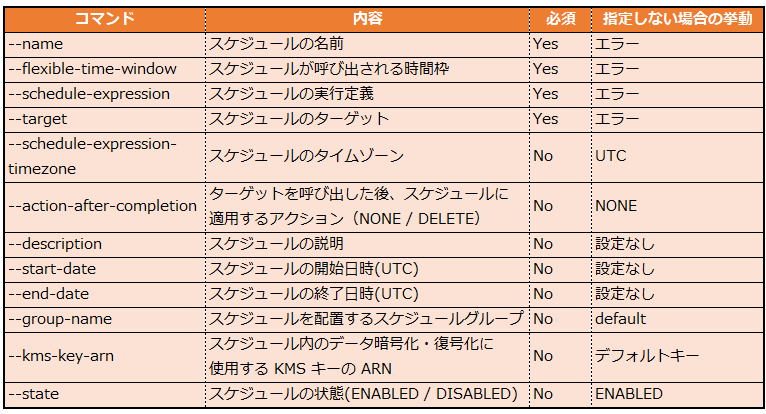
オプション
ここでは、設定に関係する主要なオプションのみ説明します。
※「指定しない場合の挙動」は検証時(2026/01/14)時点の筆者環境での結果であり、環境によって異なる可能性があります。
3. 複雑なオプションの指定
以下では、筆者が設定時に戸惑ったオプションの指定方法を説明します。
--tags の指定方法
--tags の指定方法は、「省略表現」と「JSON 表現」の 2 種類があります。¹ ³
- 省略表現(タグ単数)
--tags "Key=Name,Value=ScheduleGroupA"
- 省略表現(タグ複数)
--tags "Key=Name,Value=ScheduleGroupA" "Key=System,Value=StopInstances"
- JSON 表現(タグ単数)
--tags '[
        {"Key": "Name", "Value": "ScheduleGroupA"}
]'
- JSON 表現(タグ複数)
--tags '[
        {"Key": "Name", "Value": "ScheduleGroupA"},
        {"Key": "System", "Value": "StopInstances"}
]'
--flexible-time-window の指定方法
--flexible-time-window の指定方法は、「省略表現」と「JSON 表現」の 2 種類があります。²
- 省略表現(フレックスタイムウィンドウ オフ)
--flexible-time-window "Mode=OFF"
- 省略表現(フレックスタイムウィンドウ オン)
MaximumWindowInMinutes は分単位で指定します。
--flexible-time-window "MaximumWindowInMinutes=30,Mode=FLEXIBLE"
- JSON 表現(フレックスタイムウィンドウ オフ)
--flexible-time-window '{"Mode": "OFF"}'
- JSON 表現(フレックスタイムウィンドウ オン)
--flexible-time-window '{"MaximumWindowInMinutes": 30, "Mode": "FLEXIBLE"}'
--schedule-expression の指定方法
1 回限りのスケジュールは「at」、繰り返しのスケジュールは「rate 式」または「cron 式」を使用して指定します。²
詳細な設定方法は、ユーザーガイド「EventBridge スケジューラのスケジュールタイプ」⁴に記載されています。
- 1 回限り
--schedule-expression "at(2026-01-30T22:00:00)"
- rate 式
--schedule-expression "rate(7 days)"
- cron 式
--schedule-expression "cron(0 22 * * ? *)"
--target の指定方法(ec2:stopInstances の場合)
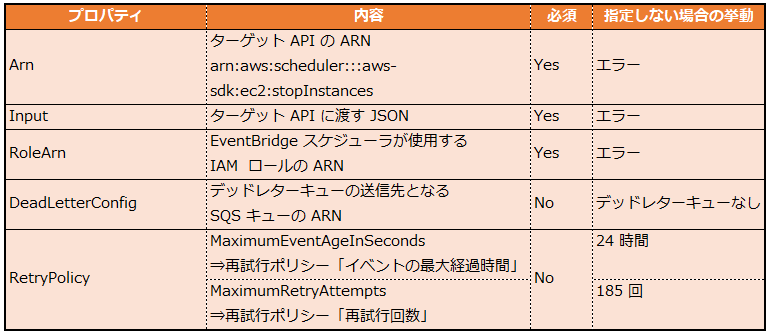
ec2:stopInstances の場合、--target のプロパティは以下で構成されます。
※「指定しない場合の挙動」は検証時(2026/01/15)時点の筆者環境での結果であり、環境によって異なる可能性があります。
- コマンド例
--target '{
        "Arn": "arn:aws:scheduler:::aws-sdk:ec2:stopInstances",
        "Input": "{\"InstanceIds\": [\"i-xxxxxxxxxx\"]}",
        "RoleArn": "arn:aws:iam::xxxxxxxxxx:role/Role01",
        "DeadLetterConfig": {"Arn": "arn:aws:sqs:ap-northeast-1:xxxxxxxxxx:Queue01"},
        "RetryPolicy": {"MaximumEventAgeInSeconds": 3600, "MaximumRetryAttempts": 10}
}'
- 再試行ポリシーをオフにする場合
"RetryPolicy": {"MaximumRetryAttempts": 0}
ワンポイントアドバイス
スケジュールの各オプションは指定方法が複雑で、分かりにくい場合があります。
迷った場合は、AWS マネジメントコンソールでスケジュールを手動作成してみましょう。
作成後、get-schedule コマンド⁵で設定値を確認すると、オプションの指定方法の参考になります。
まとめ
本記事では、EventBridge スケジューラのスケジュールグループとスケジュールについて、AWS CLI コマンドで設定する方法を説明しました。
スケジュールグループを作成する際は、create-schedule-group コマンドを使用します。
スケジュールを作成する際は、create-schedule コマンドを使用します。
オプションの指定方法に迷った場合は、AWS マネジメントコンソールでスケジュールを手動作成した後、get-schedule コマンドで設定値を確認してみましょう。
本記事が少しでもお役に立てば幸いです。
参考文献
¹ "create-schedule-group -- AWS CLI 2.32.33 Command Reference". AWS Documentation. https://docs.aws.amazon.com/cli/latest/reference/scheduler/create-schedule-group.html, (参照 2025-01-13)
² "create-schedule -- AWS CLI 2.32.34 Command Reference". AWS Documentation. https://docs.aws.amazon.com/cli/latest/reference/scheduler/create-schedule.html, (参照 2025-01-14)
³ "Using shorthand syntax in the AWS CLI - AWS Command Line Interface". AWS Documentation. https://docs.aws.amazon.com/ja_jp/cli/latest/userguide/cli-usage-shorthand.html, (参照 2025-01-15)
⁴ "EventBridge スケジューラのスケジュールタイプ - EventBridge スケジューラ". AWS Documentation. https://docs.aws.amazon.com/ja_jp/scheduler/latest/UserGuide/schedule-types.html, (参照 2025-01-15)
⁵ "get-schedule -- AWS CLI 2.33.0 Command Reference". AWS Documentation. https://docs.aws.amazon.com/cli/latest/reference/scheduler/get-schedule.html, (参照 2025-01-15)
この記事は私が書きました
Hirano
記事一覧AWSの知見を身につけるため、一大決心でP&Sに入社しました。 目標はシステム改善に大きく貢献できるエンジニアになることです。 簡単な内容であっても自身が戸惑った点を投稿することで、同じ苦労をしている方の助けになれば嬉しいです!